
Download Your Vehicle Smart Card Online in Punjab (E-Registration Card PDF)
You can download your Punjab vehicle smart card as a PDF in under a minute. Enter your registration number and chassis number on the official e-registration card portal, and a soft copy of your card — the same Form-G document that arrives by courier — saves straight to your phone or computer.
The Excise and Taxation Department introduced this download service for a simple reason: too many drivers were being fined at checkpoints for a card sitting in a drawer at home. Now the digital copy lives on your phone, ready whenever a traffic officer, a buyer, or a bank asks to see your registration. Below, we cover the exact download steps, every field printed on the card, and what to do while the physical card is still on its way.
What Is the Smart Card or E-Registration Card?
The smart card is Punjab’s modern replacement for the old paper registration book. Officially designated Form-G, it is a chip-enabled PVC card issued by the Excise, Taxation and Narcotics Control Department after every new registration and ownership transfer.
The e-registration card, meanwhile, is the digital twin of that physical card. It carries the same details, the same layout, and the same QR code. Consequently, downloading the PDF gives you a usable copy of your registration long before the courier rings your doorbell — and a permanent backup after it does.
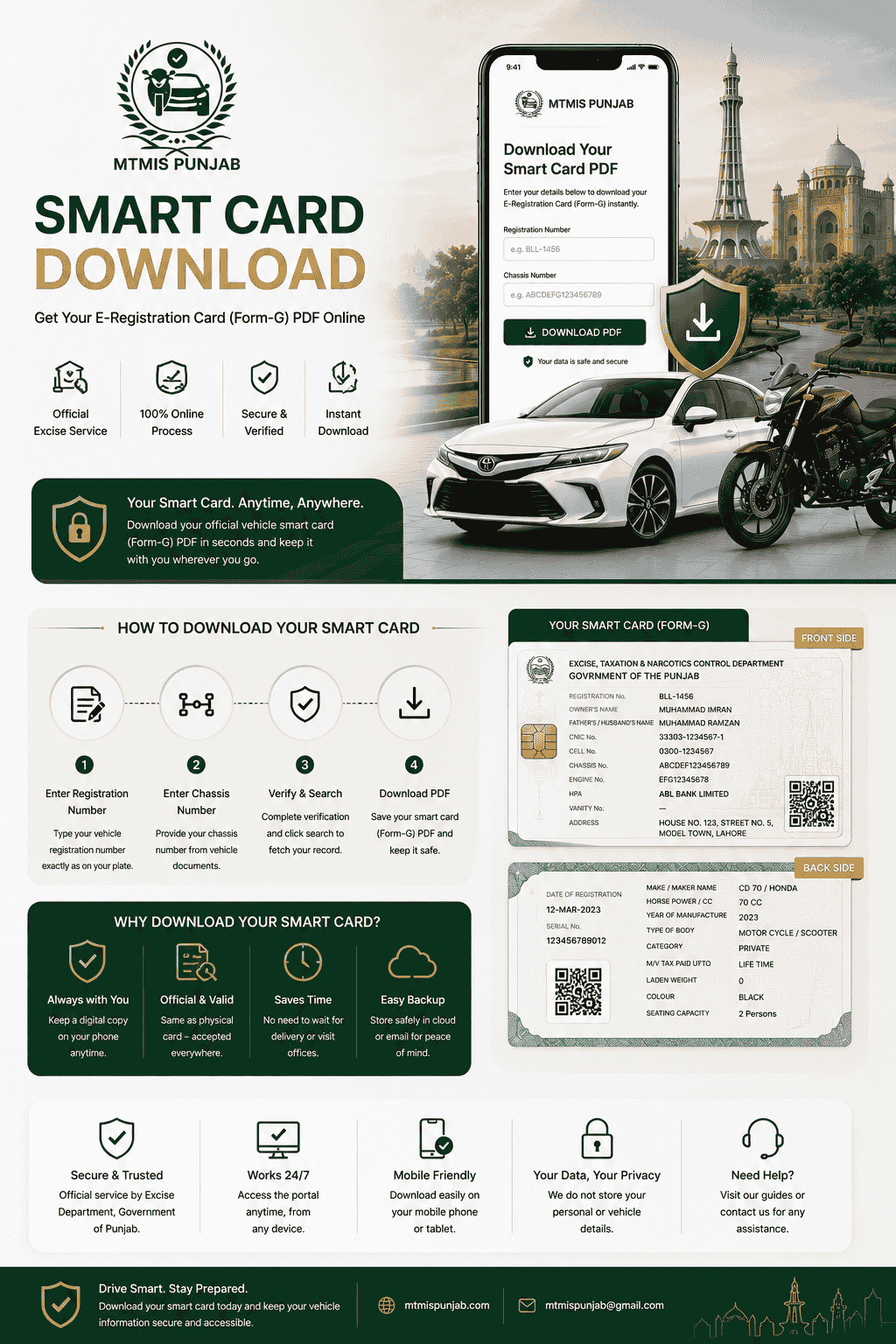
How to Download Your Smart Card PDF (Step by Step)
Keep two things from your vehicle documents nearby: the registration number and the chassis number. Then follow these steps:
- Click the download button above. It opens the official e-registration card portal run by the Excise Department.
- Enter your registration number exactly as it appears on your plate or documents — for example, BLL-1456. If the search fails, try the number without the dash.
- Enter your chassis number. You will find it on your sale invoice, your old registration book, or stamped on the vehicle’s frame.
- Complete the verification and press Search. The system matches both numbers against your record before showing anything — that pairing is what keeps strangers out of your card.
- Download and save the PDF. Store it on your phone, email it to yourself, and keep a copy in cloud storage. One download, three backups.
The whole process is free, requires no account, and works around the clock. Furthermore, you can re-download the card anytime — after a transfer, after losing your phone, or simply before a long trip.
What Information Appears on Your Smart Card
The card packs your vehicle’s entire legal identity onto two small sides. Here is every field and what it means, based on an actual issued card:
Front Side — Owner and Identity Details
| Field | What it shows |
|---|---|
| Registration number | Printed vertically along the edge — the vehicle’s plate number. |
| Owner’s name & father’s name | The registered keeper’s identity, matching their CNIC record. |
| Owner CNIC | The 13-digit national identity number the vehicle is registered against. |
| Owner cell number | The contact number provided at registration. |
| Chassis number | The frame’s unique identifier — the same number you used to download the card. |
| Engine number | The engine’s identifier; match it physically when buying a used vehicle. |
| HPA | Hire-Purchase Agreement. If a bank financed the vehicle, its name appears here; blank means no active lien. |
| Vanity number | Filled only if the owner purchased a personalized plate. |
| Address | The owner’s registered address. |
Back Side — Vehicle and Tax Details
| Field | What it shows |
|---|---|
| Date of registration | When the vehicle formally entered the Punjab record. |
| Serial number | The card’s own unique production number. |
| QR code | Scannable verification — more on this below. |
| Make & maker name | Model and manufacturer, e.g. CD 70 by Honda. |
| Horse power / CC | Engine capacity, which drives your tax slab. |
| Year of manufacture | The build year — it can differ from the registration date. |
| Type of body & category | Motorcycle/scooter, car, and Private or Commercial classification. |
| M/V tax paid upto | Your token tax position. "Life Time" means the one-time token is settled forever; a date means annual tax applies. |
| Laden weight | Relevant for commercial vehicles; shows 0 for bikes and private cars. |
| Colour & seating capacity | The recorded color and seat count. |
The QR Code: Verification in One Scan
The QR code is the card’s security backbone. When a traffic officer or any authority scans it, the code pulls the vehicle’s live record from the Excise database in real time. As a result, a forged or edited card fails instantly — the scan either matches the official record or it does not. This is also why the downloaded PDF works: its QR code is identical to the physical card’s and verifies against the same database.
Is the PDF Copy Valid Everywhere?
For everyday use, yes — the department introduced the e-registration card precisely so drivers could present a digital copy at checkpoints instead of carrying paper. The QR code makes it verifiable on the spot.
However, be sensible about the distinction. For formal transactions — an ownership transfer, bank financing paperwork, or court matters — the physical smart card remains the primary document, so keep it safe once it arrives. Think of the PDF as your daily driver and the physical card as the original in the file.
Waiting for the Physical Card? Track It Too
After a new registration or transfer, the physical card typically arrives within two to four weeks through Pakistan Post. Meanwhile, the PDF download above keeps you fully covered on the road.
If the wait stretches longer, two tools help. First, check the card’s production status on our smart card status page. Second, once dispatched, track the courier through the GPO tracking service using your registration number — try it with and without the dash. Still stuck after 25 working days? Call the Excise helpline at 0800-08786 or visit the office where you applied.
Common Problems and Quick Fixes
- "Record not found." Double-check both numbers first — a single wrong character in the chassis number fails the match. If the registration is only days old, the card may still be in production; try again after a few days.
- Card shows the previous owner after a transfer. The new card generates once the transfer completes, including biometric verification. Track your application, and download the updated card only after the process shows completed.
- A detail on the card is wrong. Fix it before it matters. Errors in the name, CNIC, or engine number require a correction at your district Excise office with original documents — the online portal cannot edit records.
- PDF will not open or looks blank. Re-download using a different browser, and open the file with a proper PDF reader rather than a chat-app preview.
- HPA shows a bank you already paid off. The lien endorsement must be formally removed at the Excise office after loan clearance; it does not disappear automatically.
Frequently Asked Questions
What do I need to download my smart card in Punjab?
Just two things: your vehicle’s registration number and its chassis number. Enter both on the official e-registration card portal, and the PDF downloads in under a minute — no account, no fee, and no visit to any office.
Is the smart card download free?
Yes, completely. Downloading the e-registration card PDF costs nothing, and you can repeat the download as often as you need. Only the physical card carries its production fee of PKR 1,300, paid once during registration or transfer.
Will traffic police accept the PDF copy?
Yes, for routine checks. The department launched the e-registration card so drivers could present a digital copy instead of paper, and the QR code lets officers verify it against the live record instantly. Keep the physical card for formal transactions like transfers.
Can someone else download my smart card?
Only if they hold both your registration number and your chassis number. The portal requires the exact pair, and the chassis number is not publicly visible — which is precisely the privacy lock that keeps casual snoopers away from your CNIC and address.
How long does the physical smart card take to arrive?
Typically two to four weeks after registration or transfer, delivered by Pakistan Post. You can track production on the status page and the parcel through GPO tracking. Meanwhile, the downloaded PDF covers you on the road from day one.
I lost my physical smart card. What now?
Download the PDF immediately so you can drive legally, then apply for a duplicate at your district Excise office. The duplicate fee is PKR 500 for motorcycles and cars, and PKR 1,000 for HTVs and rickshaws — our fees page lists the full schedule.
What does the HPA field on my card mean?
HPA stands for Hire-Purchase Agreement. If a bank or leasing company financed your vehicle, its endorsement appears there until the loan clears and you have the lien removed at the Excise office. A blank HPA field means the vehicle carries no recorded financing.
One Card, Always in Your Pocket
Your vehicle’s smart card is its legal identity, and now it lives wherever your phone goes. Download the PDF today, back it up, and you will never again turn a routine checkpoint into a fine. When the physical card arrives, file it safely — and if any question comes up along the way, our guides on smart card status, vehicle verification, and registration fees have the answers ready.
Have a question or found outdated info? Contact Us — or learn more About Us and how we keep this guide accurate.