Punjab Vehicle Smart Card Download in PDF
You can get your vehicle registration card on your phone today, even while the plastic card is still in the post. The Excise Department calls this copy the e registration card, and the Punjab vehicle smart card download needs only two details: the registration number and the chassis number.
Official card portal
E Registration Card portal
vrcentpunjab.com/card
Linked from the Excise website. Enter the registration and chassis number to get your card.
Download your smart cardWhat the Punjab vehicle smart card download gives you
In short, the download is a digital copy of your registration card. The Excise, Taxation and Narcotics Control Department, Punjab introduced it in January 2024 and described it as Punjab's first electronic title document. It was made for owners who have registered a vehicle but are still waiting for the plastic smart card.
People search for it under many names, including e registration card, e card excise, virtual smart card, e smart card and VRC Punjab. Still, they all lead to the same thing. For example, VRC is short for vehicle registration certificate, and vrcent is the name of the official card portal.
This page is an independent guide, so we do not issue cards. If you want to see how we check our facts, read the how we check page. Instead, the card portal at the top of this page is where the download actually happens. The two websites below are the other official links you may need.
Excise, Taxation and Narcotics Control Department
excise.punjab.gov.pk
The department's own website. Also, the E registration Card link sits in its Services menu.
Open the Excise websitePakistan Post tracking
ep.gov.pk/track.asp
Follow the plastic smart card while it travels to your address.
Open Pakistan Post trackingHow to download the smart card PDF, step by step
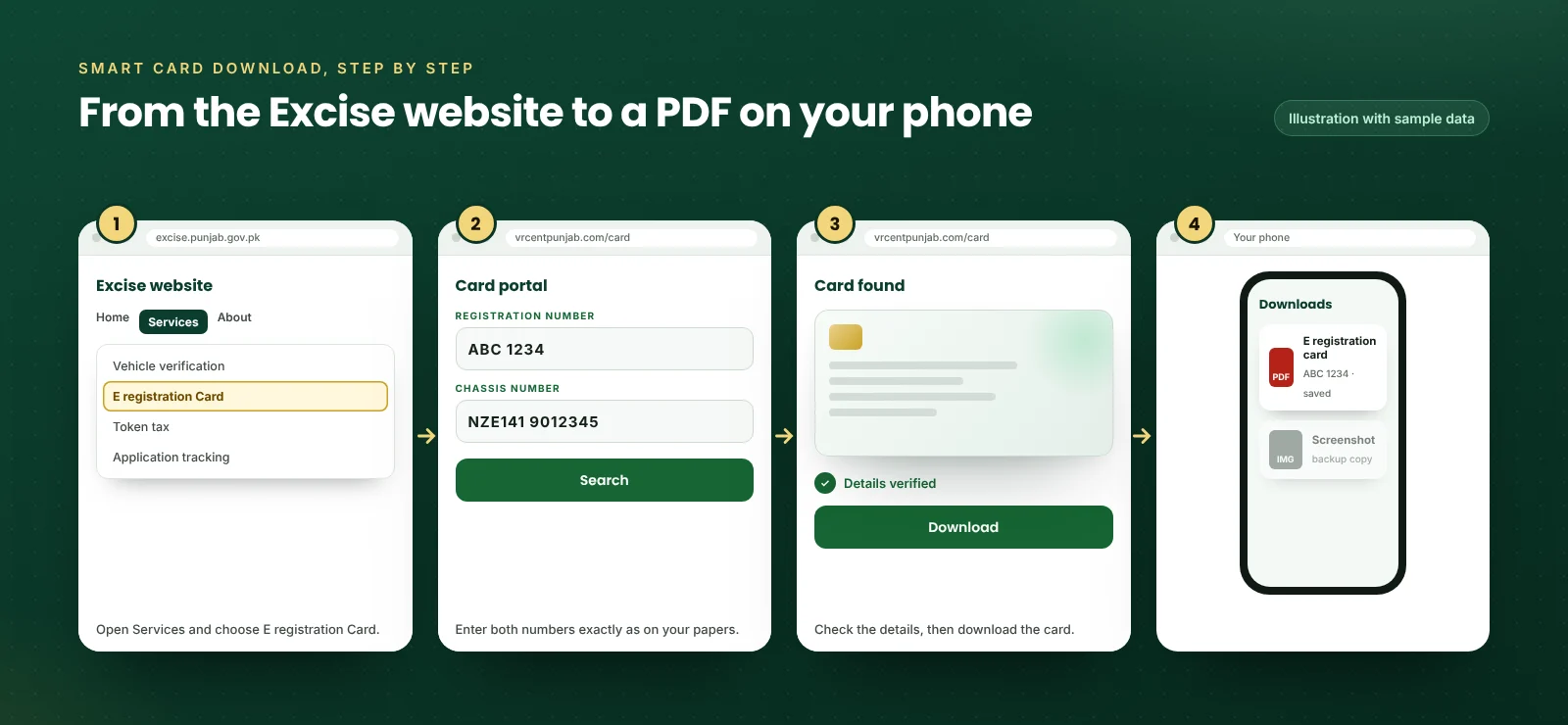
Generally, the whole download takes a few minutes on a phone or a computer. Have your smart card, registration book or a photo of either with you, since the chassis number is printed there.
- 01
Excise website
Open excise.punjab.gov.pk
- 02
Services menu
Choose E registration Card
- 03
Card portal
vrcentpunjab.com/card opens
- 04
Two numbers
Registration and chassis
- 05
Save the PDF
Keep it on your phone
- To begin with, open the Excise website at excise.punjab.gov.pk in your phone or computer browser.
- Tap Services, then choose E registration Card. The site then takes you to the card portal at vrcentpunjab.com/card.
- Then type the registration number exactly as it is on the plate, for example ABC 1234.
- Next, type the chassis number exactly as it is on your smart card or registration book.
- After that, press Search. Once the portal matches both numbers, your card appears on the screen.
- Finally, download the card and save it. Also keep a screenshot as a second copy, so you still have it if the file gets lost.
What you need before you start
What you need3 items
- Registration numberAs printed on the number plate
- Chassis numberFrom the smart card, the registration book or the vehicle itself
- A phone or computerAny browser works; no app is needed
Typing the chassis number without mistakes
When a download fails, the chassis number is the first thing to check. That is because it is long and mixes letters and digits, so a single wrong character is enough for the portal to find nothing. So copy it from your papers one character at a time.
Especially watch for the letters O and I, since they look almost the same as 0 and 1. If your number has a dash or a space on the card, try it first exactly as printed, then without the gap. Also check that you are reading the chassis number, not the engine number, because both sit close together on most documents.
Smart card or e registration card: which one do you need?
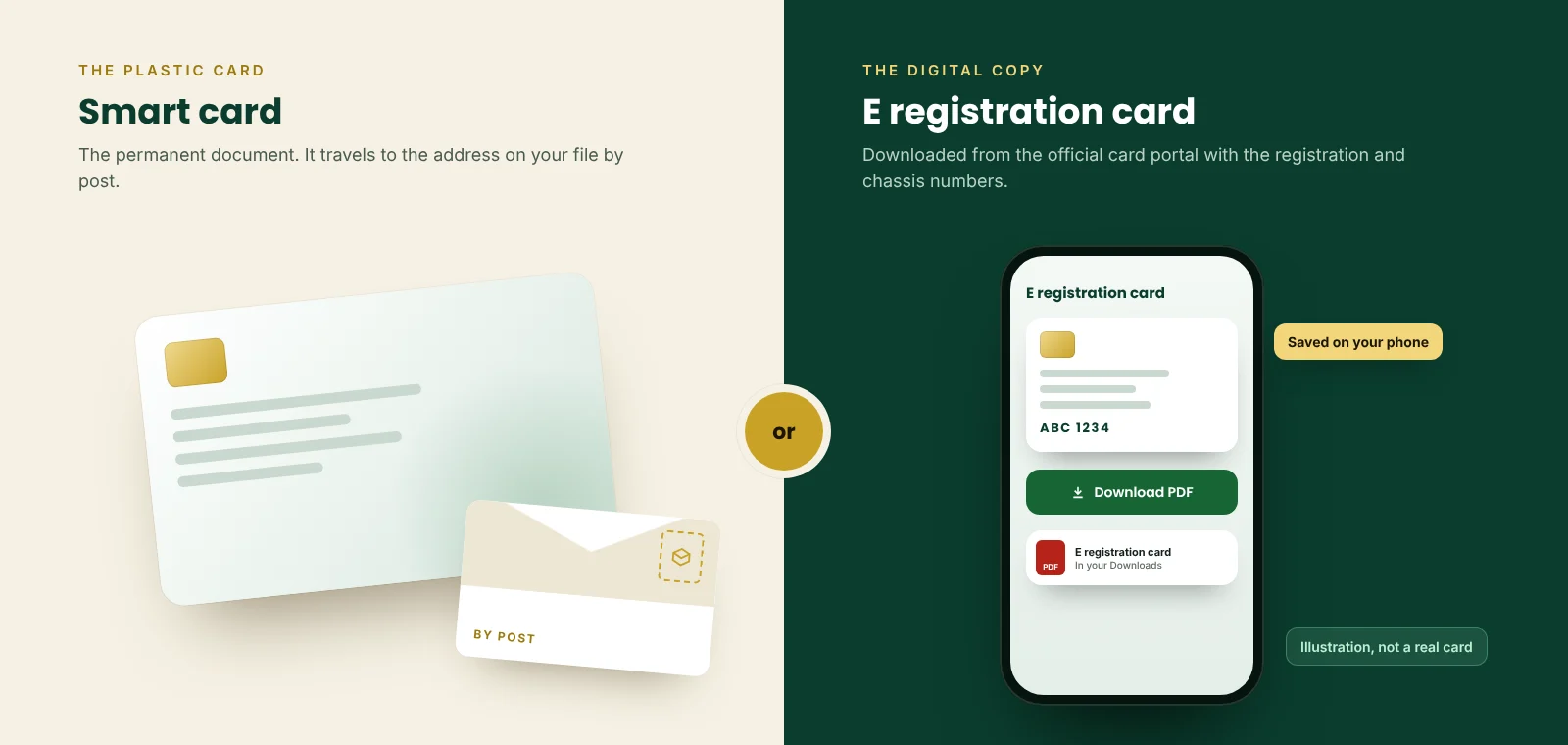
Both carry the same registration details, although they do different jobs. The plastic smart card is the permanent document, while the e registration card is a copy you can download whenever you need it.
| Smart card | E registration card | |
|---|---|---|
| What it is | The plastic registration card that replaced the paper book | A digital copy of the registration card |
| Since | Required for new registrations from 1 July 2024 | Introduced in January 2024 |
| How you get it | Sent to the address on the vehicle file | Downloaded from the official card portal |
| What you need | Nothing, it arrives after registration or transfer | The registration number and the chassis number |
| Delivery charge | Revised to Rs 48 per card in September 2025, pending final approval | None, because nothing is posted |
| Best use | Your permanent record of ownership | While the card is on its way, or when it is at home |
Source: Excise, Taxation and Narcotics Control Department, Punjab; ProPakistani; ARY News; PakWheels.
Where the e card helps
- When you have registered or transferred a vehicle but the card has not arrived yet
- When the plastic card is at home and you need the details on your phone
- You want a backup copy in case the card is lost or damaged
Where you still need the plastic card
- We have not seen an official notice that says police must accept the digital copy instead of the card
- A buyer will usually expect the plastic card when you sell the vehicle
- Excise office work such as a transfer usually asks for original documents
When the e registration card download does not work
If the portal shows nothing, the cause is usually one of a handful of problems. Work through them in this order, because the first ones are the most common.
| What you see | Likely reason | What to do |
|---|---|---|
| No record found | A typing mistake in the registration or chassis number | Copy both numbers again from your papers, character by character |
| No record for a new vehicle | The registration has not been completed in the record yet | Check the file on MTMIS, then try again after a few working days |
| Old owner on the card | The transfer has not been completed at the Excise office | Ask the seller to finish the biometric transfer |
| Wrong detail on the card | An error in the vehicle record itself | Take your documents to the Excise office so the record can be corrected |
| Page will not load | A busy portal or a mistyped web address | Type vrcentpunjab.com/card exactly, or open it from the Excise website |
| PDF will not open | An incomplete download or an old PDF reader | Download it again on a stable connection and open it in a browser |
Also, you can check whether a vehicle file is complete on our MTMIS vehicle verification check. Because it shows the owner, the registration date and any open application, it tells you quickly whether the record is ready.
Can you download the smart card by CNIC?
No. The card portal only asks for the registration number and the chassis number, so there is no smart card download by CNIC. As a result, a CNIC alone will not show you the vehicles registered in a name.
If you have lost both the card and the chassis number, the vehicle itself still carries the chassis number on its frame. Otherwise, take your original CNIC to your Excise office and ask for the details of your own vehicle.
Bike smart card download
Motorcycle owners use exactly the same route. In fact, the bike e card download asks for the bike registration number and its chassis number, and the card comes out in the same format as a car card.
On a bike, the chassis number is usually stamped on the frame near the steering head. It is also printed on the smart card or registration book. If you are buying a used bike, run a bike verification first, so you know the record is clean before you rely on any card.
Printing the card and keeping it safe
You can print the e registration card at home or at any print shop. Generally, a colour print on good paper is easy to read, but it is still a copy of a digital document, not a plastic smart card.
Treat the chassis number like a password for this portal, because anyone who has it with your registration number can open your card. So never post photos of your card, book or chassis plate on social media or in public groups.
Also check the web address before you type anything. The portal is vrcentpunjab.com. However, many people type vrcentpunjab.com.pk or similar addresses, which are not the official portal. So the safest way in is through the Services menu of excise.punjab.gov.pk.
Lost or damaged smart card
The e registration card is the quickest stopgap when the plastic card is lost, because you can download it again at any time. For a replacement plastic card, however, you need to apply for a duplicate at the Excise office.
First, take your original CNIC and any copy of the registration details you have, including the e registration card. Then ask the office for the current duplicate card fee and the documents it needs, since these can change.
From the registration book to the e registration card
The way Punjab issues vehicle documents has changed several times in the last few years. So this short history explains why so many owners now rely on the digital card.
Late 2021
Doorstep delivery by Pakistan Post
Smart cards and number plates start going to owners by post instead of being collected.
October 2023
Card production stops for a while
The Excise Department pauses cards after its producer halts work, and a backlog builds up.
January 2024
E registration card launched
Owners waiting for a card can download a digital copy with two numbers.
1 July 2024
Smart cards for every new registration
The smart card replaces the paper registration book.
September 2025
Courier charge revised
The smart card delivery charge is revised from Rs 27 to Rs 48, pending final approval.
Questions people ask about the smart card download
Is the Punjab vehicle smart card download free?
News reports describe the e registration card as free, and the official portal does not ask for any payment in the steps described by the Excise Department. So if any website or agent asks you to pay for the download, close it and use the official portal instead.
Will the police accept the e registration card?
The department introduced the e card so that owners waiting for their plastic card have something to show. However, we have not found an official notice that says traffic police must accept it in place of the card. So carry the plastic card once it arrives, and keep the PDF as a backup.
Can I download a card for a vehicle I want to buy?
Only if the seller gives you the chassis number, because the portal needs it. Otherwise, the portal will not open the card. For a purchase, however, a vehicle verification on MTMIS is more useful, since it shows the owner, the token tax and any open application on the file.
How long does the plastic smart card take to arrive?
The Excise Department does not publish a fixed delivery time. Once the card is booked with Pakistan Post, you can follow it on our smart card tracking page with the tracking number or simply the vehicle number.
What is vrcentpunjab.com?
Simply put, it is the card portal that the Excise website opens when you choose E registration Card under Services. Surprisingly, the address ends in .com, not .gov.pk, which catches many people out. That is why the safest route is to start on excise.punjab.gov.pk and follow the link from there.
Can I download the smart card on my phone?
Yes, because the portal works in a normal phone browser and the card saves straight to your phone. After that, you can open it without internet, which helps when you are on the road and the signal is weak.
Why does my e registration card still show the old owner?
The card simply shows what the Excise record says. So if the transfer into your name has not been completed, the record still names the previous owner. Complete the biometric transfer at the Excise office, then download the card again.
Sources
- Excise, Taxation and Narcotics Control Department, PunjabGovernment of Punjab Official
- E Registration Card portalLinked from the Excise website
- Punjab Excise launches virtual vehicle registration cardPakWheels, 17 January 2024
- Guide to download the Excise smart cardARY News, 13 April 2026
- Punjab launches e registration card for vehicle ownersARY News, 3 September 2024
- Punjab Excise makes smart cards mandatory for vehicle registrationProPakistani, 24 July 2024
- Punjab Excise is no longer making smart cards for cars and bikesProPakistani, 12 October 2023
- Pakistan Post to carry out home deliveries of vehicle smart cardsProPakistani, 3 December 2021
- Excise Department revises courier service chargesARY News, 19 September 2025
Card still on its way?
Your Punjab vehicle smart card download keeps you covered for now. Meanwhile, see exactly where the plastic card is with Pakistan Post.