Independent guide, not affiliated with the Punjab Excise Department. Official portal: mtmis.excise.punjab.gov.pk

By mtmispunjab.comUpdated
MTMIS Application Tracking: Check Your Vehicle File Status Online
Paid the fee, handed over your papers, and now you are waiting? MTMIS application tracking shows exactly where your vehicle file stands with the Excise, Taxation and Narcotics Control Department, Punjab. Enter your application ID and chassis number below, and the service, phase and status appear in seconds.
To track a vehicle registration application in Punjab, enter your Application ID from the Excise or dealer receipt and the vehicle's chassis number in the form below. Then type the security code and press Track application. The result shows the business process, business phase, phase status and overall application status. The official portal at mtmis.excise.punjab.gov.pk/app shows the same record.
What Is MTMIS Application Tracking?
MTMIS stands for Motor Transport Management Information System. The Punjab Excise department runs it with the Punjab Information Technology Board (PITB), and it holds the record of every vehicle registered in the province.
Whenever you apply for a service, such as registering a new car or transferring a used bike, MTMIS opens a file for that request. MTMIS application tracking lets you follow that file from the counter to the final step, which is usually the delivery of your smart card.
In other words, it answers one simple question: "Where is my application right now?" That makes it different from vehicle verification, which checks the record of a vehicle that is already registered.
| Service | What you enter | What it tells you | Use it when |
|---|---|---|---|
| MTMIS application tracking | Application ID + chassis number | Stage and status of a request you have filed | You applied and want progress |
| Vehicle verification | Registration number | Owner, token tax, payments and vehicle details | You are buying a used vehicle |
| Smart card tracking | EXC tracking ID or registration number | Where Pakistan Post has your card | Your card is printed and on its way |
| E-registration card | Registration and chassis number | A PDF copy of your smart card | You need proof while the card travels |
These checks work best together. Track the application first, then follow your smart card with Pakistan Post once it ships. Meanwhile, you can download the e-registration card if you need a copy on your phone.
What You Need Before You Start
You only need two details, plus a few seconds to read the security code. Keep them in front of you so the first attempt works.
- Application ID from your Excise, facilitation centre or dealer receipt
- Chassis number, exactly as written on your documents
- A phone or computer with a working internet connection
Where to Find Your Application ID
The application ID is a number printed on the receipt you receive when the Excise counter, a facilitation centre or your dealer submits the request. If a dealer registered your new vehicle, ask them for that receipt, because it carries the same ID.
Bought a new vehicle from a dealer? Most dealers file the registration through the Excise department's Dealer Vehicle Registration System (DVRS). In that case, the dealer holds your receipt, so ask for a copy when you collect the vehicle.
Lost the slip? The office that took your application can look it up for you. Take your original CNIC and any payment proof along.
Where to Find the Chassis Number
Look for the chassis number on the sales invoice, the sale certificate and your old registration book or card. It is also stamped on the vehicle frame itself. Copy it exactly, letter for letter.
For example, a zero and the letter "O" look almost identical on paper. So if the result says no record found, check those characters first.
How to Use MTMIS Application Tracking, Step by Step
The form at the top of this page connects to the official MTMIS portal for you. Here is the whole process from start to finish.
Prefer the Official MTMIS Portal?
You can also use the department's own page. It asks for the same two details and returns the same record. However, the official portal often fails to load outside Pakistan. The form on this page works from anywhere, which helps overseas Pakistanis who manage a vehicle back home.
Your MTMIS Application Tracking Result, Field by Field
The result looks like an official slip, and every line carries meaning. Here is a sample with made-up details, so you know what to expect before you search.
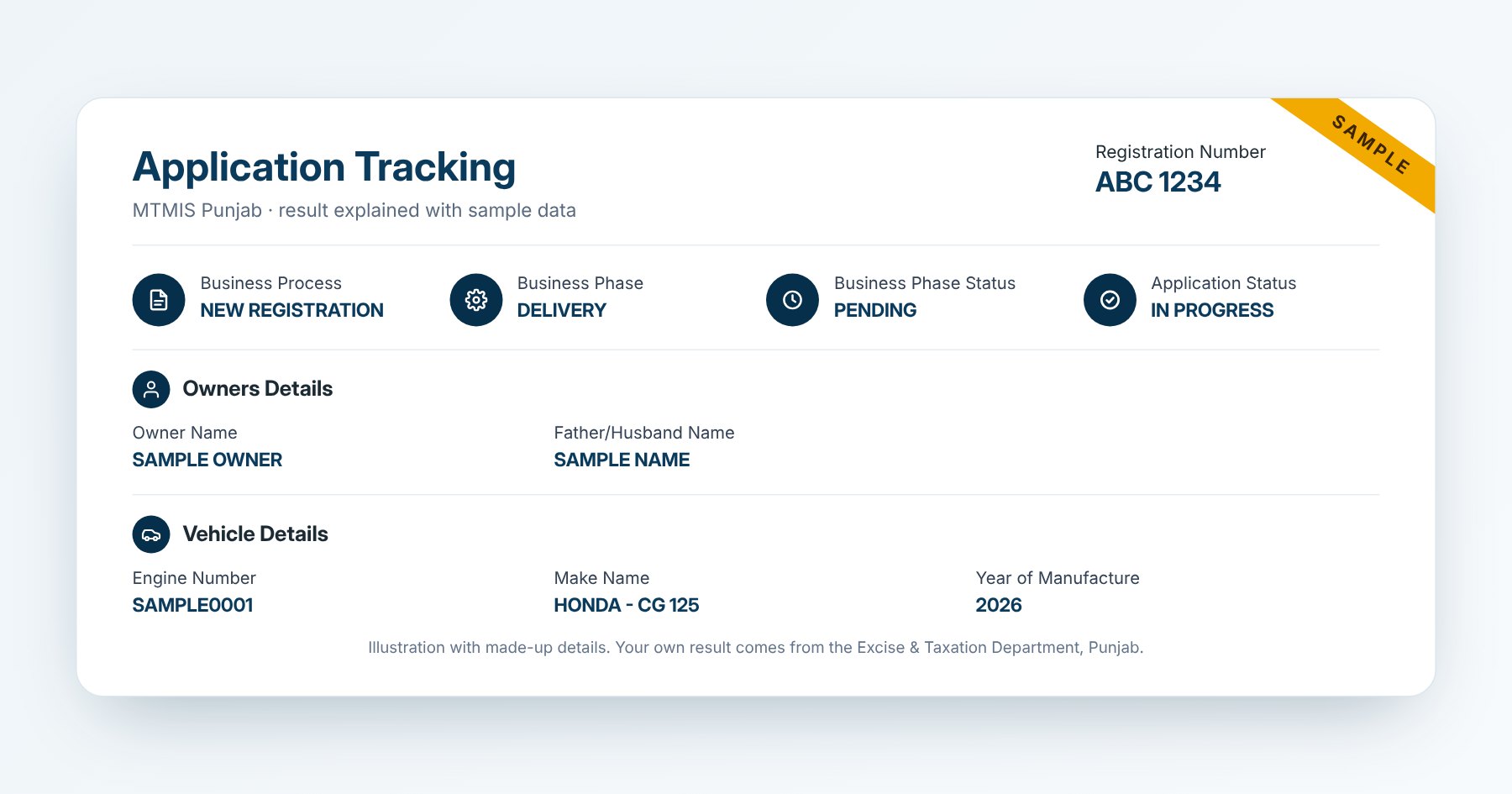
| Field | What it means | Example |
|---|---|---|
| Registration Number | The number assigned to the vehicle | ABC 1234 |
| Business Process | The service you applied for | NEW REGISTRATION |
| Business Phase | The stage your file has reached right now | DELIVERY |
| Business Phase Status | Whether that stage is finished or still waiting | PENDING |
| Application Status | The overall state of the whole request | IN PROGRESS |
| Owner Name | The person or company receiving the registration | As per CNIC |
| Father/Husband Name | Tells apart owners who share the same name | As per CNIC |
| Engine Number | The number stamped on the engine | Must match the vehicle |
| Make Name | Manufacturer and model | HONDA – CG 125 |
| Year of Manufacture | The model year on record | 2026 |
Business Process: The Service You Asked For
This field names the service behind your file. NEW REGISTRATION appears for a brand-new vehicle, while TRANSFER OF OWNERSHIP appears when a used vehicle changes hands. Other requests carry their own names, so read this field first to confirm you are looking at the right application.
Business Phase and Business Phase Status
Behind the scenes, the department handles each file in stages, for instance document checks, approval, card printing and dispatch. The Business Phase shows the stage your file sits in now. Next to it, the Business Phase Status tells you whether that stage is complete.
So DELIVERY with PENDING means your file has reached the final stage, but the card has not left yet or is still travelling. The exact phase names on your own result may differ slightly.
Application Status: The Big Picture
Application Status sums up the whole request. IN PROGRESS means work is still going on somewhere in the chain. Once the department finishes its part, this field changes, and the same application also appears on vehicle verification under Vehicle Application Tracking.
Owner and Vehicle Details: Catch Typos Now
Read the owner name, father or husband name, engine number and make carefully. A spelling mistake is far easier to fix while the file is still open than after the card prints.
If anything looks wrong, visit the office that took your application straight away. Take your CNIC and the original documents with you.
What Each MTMIS Application Tracking Status Means
Status labels can feel cryptic at first. The table below turns the combinations owners see most often into plain language, along with the right next step.
| What you see | What it means | What to do |
|---|---|---|
| IN PROGRESS, in any phase | The department is still working on your request | Wait, then check again in a few days |
| DELIVERY with PENDING | Your file reached the last stage; the card is being dispatched or is already in the post | Track the card with Pakistan Post |
| DELIVERED | The department has completed delivery from its side | No card yet? Use smart card tracking |
| No record found | The ID and chassis number do not match a file | Recheck both details, character by character |
| Wrong owner or vehicle details | A data entry error at submission | Visit the registering office before the card prints |
The department can add new labels at any time. When you see a value that is not listed here, the Business Phase usually gives the clearest clue.
How Long Does a Vehicle Application Take?
Timing depends on the service, the district and the season. Still, most files follow a similar path, and knowing it helps you judge whether yours is on schedule.
| Stage | Where it happens | Typical time |
|---|---|---|
| Submission and fee payment | Excise counter, facilitation centre or dealer | Same day |
| Document check and approval | Motor Registration Authority (MRA) | A few working days |
| Smart card printing | Central card production in Lahore | Usually soon after approval |
| Booking with Pakistan Post | Lahore GPO | Soon after printing |
| Delivery to your address | Your local post office | Commonly 2 to 4 weeks in total |
Busy periods, such as the start of the fiscal year in July, can add time. Even so, if nothing changes for about four weeks, contact the department.
MTMIS Application Tracking Problems and Quick Fixes
Most problems come down to a typo or a busy server. Before you travel to an office, run through this list.
| Problem | Likely reason | Fix |
|---|---|---|
| "No record found" | A typo in the application ID or chassis number | Re-enter both, and check 0 against O and 1 against I |
| "Chassis number is required" | The field is empty or has a stray space | Type it again with no spaces at either end |
| Security code rejected | The code expired or was misread | Tap refresh and type the new code |
| Status unchanged for weeks | A missing document, unpaid dues or a backlog | Call the Excise helpline or visit your MRA office |
| Official portal will not open | Heavy traffic, or you are outside Pakistan | Use the form on this page, or try later |
| Wrong owner or vehicle details | An entry error at the counter | Ask the office to correct it before printing |
When and How to Contact the Excise Department
Most files move without any help. However, call or visit if your status has not changed for around four weeks. Do the same if your details are wrong, or if the result shows no record although you hold the receipt.
| Channel | Details |
|---|---|
| Helpline | 1035 |
| Head office phone | 042-99203848, 042-99203849 |
| Head office address | Transport House, 11-A Egerton Road, Lahore |
| Services by appointment | appointment-excise.punjab.gov.pk |
| Official website | excise.punjab.gov.pk |
What to Take to the Office
- Original CNIC of the applicant
- The receipt that shows your application ID
- Proof of fee payment, such as the PSID or bank receipt
- Purchase or transfer documents for the vehicle
Related Vehicle Services in Punjab
An application is rarely the only item on your list. These guides cover the steps that usually come before and after it.
Frequently Asked Questions About MTMIS Application Tracking
01Is MTMIS application tracking free?
Yes. Checking your status costs nothing, both on this page and on the official portal. Nobody should ask you for money just to track a file.
02Can I use MTMIS application tracking without the chassis number?
No. The system needs both the application ID and the chassis number, which stops strangers from viewing your file. You will find the chassis number on your invoice or registration papers.
03Can I track my application with my CNIC or registration number?
Not with this tool. For a registered vehicle, however, vehicle verification works with the registration number and also shows the latest application against it.
04How often does the MTMIS application tracking status change?
The status changes whenever the department finishes a step on your file. Therefore, checking once every few days is plenty.
05Does MTMIS application tracking cover transfer of ownership?
Yes. A transfer shows TRANSFER OF OWNERSHIP as the business process. You track it the same way, with the application ID and chassis number.
06My status says DELIVERED, but I have no card. What now?
First, follow the card with Pakistan Post using smart card tracking. If the post office could not deliver it, the card goes back to the Excise department, so collect it from the MRA office that handled your application.
07Can overseas Pakistanis use MTMIS application tracking?
Yes. The form on this page works from any country, because it reaches MTMIS through a server in Pakistan. By contrast, the official portal may not load abroad.
08Is mtmispunjab.com the official Excise website?
No. We are an independent guide. Your result comes live from the official MTMIS portal, and we do not store what you enter. For any change to your record, deal with the Excise department directly.
Stay One Step Ahead of Your Vehicle File
A quick check today saves a wasted trip tomorrow. Use MTMIS application tracking whenever you want an update, and fix any wrong details early. Then, once your card is on the road, switch to smart card tracking. If a file stays stuck, the 1035 helpline and your MRA office can push it forward.
Last reviewed: 10 October 2026. Field names and statuses come from live MTMIS results that our team checked.
Disclaimer: mtmispunjab.com is an independent information website and is not affiliated with the Excise, Taxation and Narcotics Control Department, Punjab. See our disclaimer and privacy policy.